
Vidu Q4Vidu Q4
Loading

Vidu Q4 Studio

Start with an image. Set the motion, sound and resolution, then make it a video.

Vidu Q4 Preview
Video settings
0/12 images · 0/3 voices
Choose images or voice referencesPNG, JPG, JPEG, WebP or audio files

Add images and audio together. At least 1 image is required; up to 12 images and 3 optional voice references.

5 seconds
Advanced settings

Estimated cost

5 credits

1 credits / second
Sign in to generate

Charged per second at your selected resolution. Add credits

A humanoid dog of the San Bernardo breed is on the stage of a karaoke howling a song and moving his enormous body trying to dance. Behind the dog , on stage reads the phrase in English: Karaoke Dog Contest

Use prompt loads the references and settings. Review them before generating.

Credits per second
540P
1
720P
3
1080P
4
2K
5
4K
8

What Is Vidu Q4?

Vidu Q4 is an AI video model from Shengshu Technology that generates video and sound together.

Vidu Q4 is an AI video model from Shengshu Technology, the company behind Vidu. You give Vidu Q4 an image, or a set of reference images and voice clips, and describe what should happen. It returns a finished video with synchronized sound, including speech and sound effects, so you do not record or edit audio afterward.

Vidu Q4 launched in early October 2026 as a Preview. Shengshu has said the Preview comes before the full version and that user feedback will shape the final release. That makes Vidu Q4 Preview a good model to test now, with one caveat: details can change before the full release.

Vidu Q4 works in two modes:

  • Image-to-video: one image plus a prompt becomes a 3 to 16 second video.
  • Reference-to-video: 1 to 15 reference images and up to 3 voice references become one video where characters, scenes and voices stay consistent.

Output goes up to 4K resolution.

Vidu Q4 Preview introductionWatch with sound

One limit matters before you start. Vidu Q4 does not support text-to-video yet. Every Vidu Q4 video begins with at least one image. If you only have a text idea, make a first-frame image first, or use an earlier Vidu model such as Vidu Q3, which accepts text prompts.

Before models like this, a talking character in a shot meant filming real footage, or animating a scene and recording the voice separately. Vidu Q4 does both in one step.

Imagined with Vidu Q4

Explore videos and prompts, then use the references to create your own version.

Vidu Q4 Key Features

Six things Vidu Q4 does that decide whether a clip is usable: sound, resolution, length, references and voices, motion and aspect ratio.

Native audio in Vidu Q4

Vidu Q4 makes sound and picture together. Write the line a character should say in your prompt, and the clip comes back with that dialogue, lip-synced, plus sound effects. You skip the separate voiceover step. This matters most in dialogue scenes: when the voice comes from the same generation as the face, the lips and the words line up, and you never have to sync a recorded track to a silent clip.

Output up to 4K

Vidu Q4 offers 540p, 720p, 1080p, 2K and 4K. Draft at 540p to check motion and framing, then render the version you keep at 2K or 4K. Higher resolution also gives you room to crop one clip into different formats.

Clips up to 16 seconds

Image-to-video clips run 3 to 16 seconds. In reference-to-video, Vidu Q4 can tell a multi-shot scene of up to 16 seconds with smooth camera moves. Longer clips mean fewer cuts to stitch together afterward, and for a short ad or a social post one generation can cover the whole piece.

Up to 15 reference images and 3 voice references

Combine 1 to 15 images for characters, scenes and style, and add up to 3 voice references, so a complex idea comes out in one take instead of several stitched clips. A typical set is a lead character from two or three angles, a second character, a location and a prop, all sent in one request. The voice references clone a character's voice, with natural emotion and lip-synced delivery. Add a clean sample for each character, and each one keeps its own voice from scene to scene.

Smoother action and effects

Vidu says Vidu Q4 keeps martial arts, running and combat fluid, with fewer deformations, stutters and artifacts. Explosions, smoke, particles and energy effects are rendered to match the scene. Action shots are where AI video most often breaks, so check the first draft closely, especially hands, limbs and fast camera moves.

Your aspect ratio, kept

In image-to-video, Vidu Q4 outputs the same aspect ratio as the image you upload, so a vertical photo gives a vertical video. That saves a re-crop step: pick the image in the shape your platform needs before you upload it.

Silk and lighting detail illustrating high-resolution video

Vidu Q4 Image to Video

Upload one image, describe the motion and camera, and Vidu Q4 extends the still into a 3 to 16 second video.

Vidu Q4 image to video starts from a single first frame. Upload a photo, illustration, product shot or character artwork, then describe the action and the camera move. Vidu Q4 keeps the subject and composition of your image and animates it from there.

  • 3 to 16 seconds: pick the length that fits the shot.
  • Sound included: add a spoken line or a sound cue to the prompt and the clip comes back with audio.
  • Up to 4K: choose 540p for a quick draft, or 2K and 4K for the final render.
  • Your aspect ratio: vertical in, vertical out.

Vidu Q4 image to video works well for animating portraits, product showcases, illustrations and character scenes with dialogue. If you used the Vidu AI image to video tool on Vidu Q3, the main change is output resolution: Q3 stops at 1080p, and Vidu Q4 reaches 4K.

Vidu image to video gives better results when you keep the prompt focused. Describe one main action instead of five, name the camera move, such as a slow push-in or a pan, and put any spoken line in quotation marks. Start from a sharp image where the subject is clearly in frame.
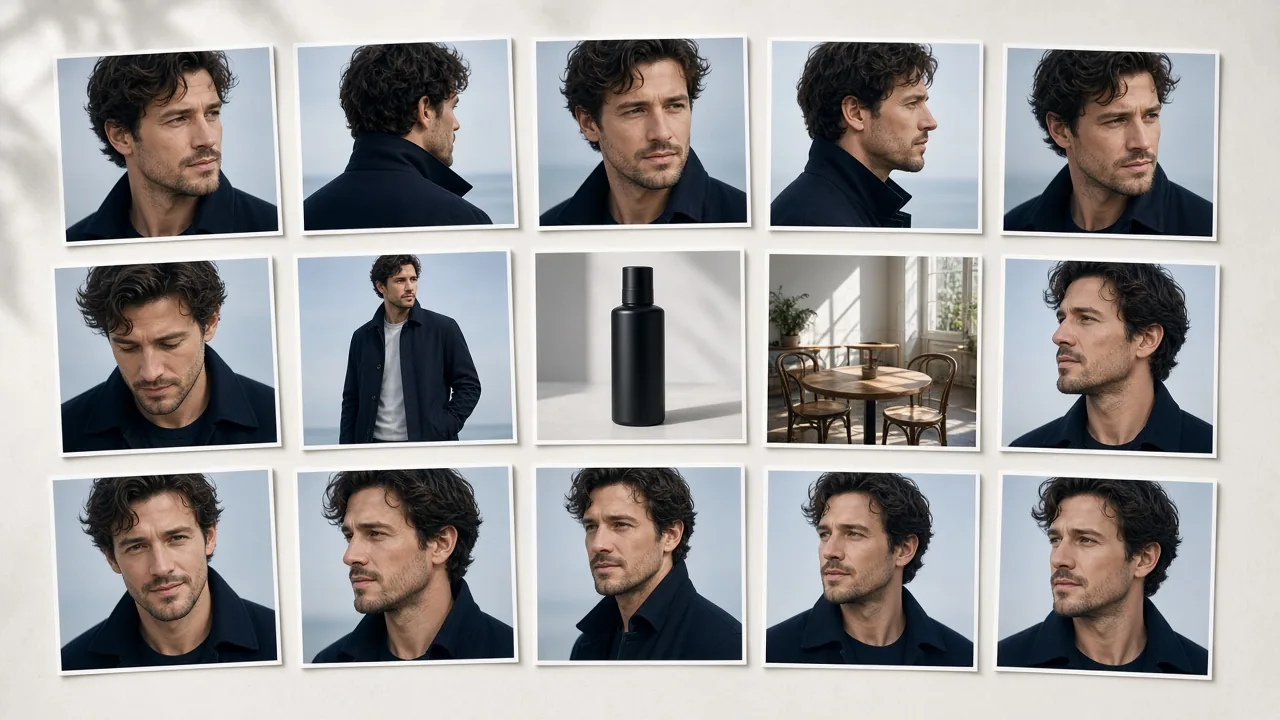
Reference images for a character, clothing, product and location

Vidu Q4 Reference to Video

Combine 1 to 15 reference images and up to 3 voice references so characters, scenes and voices stay the same.

Vidu Q4 reference to video is built for stories where the same character has to look and sound the same every time. Upload images of characters, objects or scenes, add up to 3 voice references, and describe the scene. Vidu Q4 returns one video with picture and audio in sync.

  • More references: 1 to 15 images for characters, scenes and style, told in one take.
  • A cloned voice: up to 3 voice references give a character a consistent voice, with natural emotion and lip-synced delivery.
  • One take, full scene: up to 16 seconds of multi-shot storytelling with smooth camera moves, at up to 4K.

Start with Vidu reference to video when you are making an AI series, an ad with a recurring character, or any scene with more than one subject. Use image-to-video instead when you have a single image and only need it to move.

Give each character its own image, keep the style consistent across your references, and say in the prompt who does what. If two references look alike, Vidu Q4 has less to go on, so use clearly different images for different characters.

Who Is Vidu Q4 Built For?

AI series makers, advertisers, social creators and filmmakers who start from images and need sound and consistency.

For AI series and short drama makers

Keep the same cast across episodes. Load up to 15 reference images and 3 voice references into Vidu Q4 reference to video, and each new scene starts from the same faces and voices, so viewers meet the same characters in episode one and episode ten.

For advertisers and brand teams

Turn a product still into a moving shot with Vidu Q4 image to video. Test ideas at 540p, then render the winner at 2K or 4K. A still from your catalog becomes a clip with sound, without a shoot.

For social creators

Make 3 to 16 second clips with sound already in them. Vidu Q4 keeps your image's aspect ratio, so vertical and wide posts come out ready to upload. One image and one prompt is enough to start.

For filmmakers and previs

Use Vidu Q4 for fast action, such as chases and fights, and for multi-shot scenes of up to 16 seconds with camera moves. It is a quick way to see a scene, a camera move or an effect before you spend a day shooting it.

Get Started With Vidu Q4 in Three Steps

Three steps from image to finished clip: add your images, write the prompt, then choose length and resolution.

  1. Upload your images and voices

Choose image-to-video if you have one image, or reference-to-video if you have several images or want to add voice references. Add one image for image-to-video, or 1 to 15 reference images for reference-to-video. In reference-to-video you can also add up to 3 voice references. Vidu Q4 has no text-only mode, so each video needs at least one image. Use one clear image per character, with the face easy to see, and a clean voice sample with a single speaker. Vidu Q4 reads these as the look and the voice to keep.

  1. Describe the scene

Write what should happen, how the camera moves, and what each character says. Vidu Q4 turns the spoken line into lip-synced audio, so put dialogue in the prompt instead of editing it in later. For example: The woman turns to the camera and says, “We leave at dawn.” Slow push-in, wind in the trees.

  1. Choose length and resolution, then generate

Pick a length between 3 and 16 seconds and a resolution from 540p to 4K. Do a 540p draft first. If the motion and framing are right, generate the final Vidu Q4 video at 2K or 4K. Length and resolution both change the credit cost, which the cost section below explains.

You get a finished video with its audio already in it, ready to download. For prompt examples and troubleshooting, read the full guide: How to use Vidu Q4.

Vidu Q4 Specs

The limits that decide what you can make, taken from Vidu's own Q4 page and API documentation.

SpecVidu Q4 Preview
ModesImage-to-video, reference-to-video
Text-to-videoNot supported
Video length3 to 16 seconds (image-to-video); 1 to 16 seconds (reference-to-video)
Resolution540p, 720p, 1080p, 2K, 4K
Reference images1 to 15 (reference-to-video)
Voice references0 to 3
AudioNative, generated with the video
Aspect ratioImage-to-video keeps the ratio of your image
StatusPreview

Vidu's API lists the model as viduq4-preview. Its documentation lists Vidu Q4 at 3 to 16 seconds for both modes, while Vidu's Q4 page says reference-to-video can start at 1 second. If you need a very short clip, check the minimum length in the tool.

How Vidu Q4 Compares to Q3

Vidu Q4 reaches 4K and takes more references. Vidu Q3 still has text-to-video and first-last frame.

Vidu Q3Vidu Q4 Preview
ReleaseJanuary 2026October 2026 (Preview)
Text-to-videoYesNo
Image-to-videoYesYes
First-last frameYes (Q3 Pro)Not listed
Reference-to-videoYesYes
Reference imagesNot published1 to 15
Voice referencesNot publishedUp to 3
Max resolution1080p4K
Max length16 seconds16 seconds
Native audioYesYes
API price at 1080p13 to 29 credits per second, depending on the Q3 version24 credits per second

On cost, Vidu Q4 sits level with Vidu Q3 Pro. At 1080p both list 24 credits per second in Vidu's API, and at 720p it is 19 for Vidu Q4 and 20 for Vidu Q3 Pro. The extra cost in Vidu Q4 comes from the 2K and 4K options, which Q3 does not have.

Where Vidu Q4 is better: resolution, with 2K and 4K that Q3 does not offer, and reference-to-video, with a published limit of 15 images and 3 voice clips.

Where Vidu Q3 is better: it supports text-to-video and first-last frame, which Vidu Q4 does not list. Its Turbo version costs 13 credits per second at 1080p, about half of Vidu Q4. And Vidu Q3 is a released model, while Vidu Q4 is a Preview that may change.

Pick Vidu Q4 for 2K or 4K output, many references, or cloned voices. Pick Vidu Q3 when you start from text, or when cost matters more than resolution.

Full breakdown with test clips: Vidu Q4 vs Q3.

What a Vidu Q4 Clip Costs

You pay by the second, and the resolution you pick matters most.

Starter
$19.9

$0.099 per credit One-time

  • 200 credits included
  • up to 6 10-second 720p Vidu Q4 videos.
  • AI Model: Vidu Q4 Vidu Q4 Preview Vidu Q3 Vidu AI Models
  • create HD text-to-video or image-to-video clips with natural native audio
  • 720p、1080p、4k export, No watermark download
  • Commercial use license
  • Standard queue speed
  • Email support
Most Popular
Plus
$49.9

$0.083 per credit One-time

  • 600 credits included
  • up to 20 10-second 720p Vidu Q4 videos.
  • AI Model: Vidu Q4 Vidu Q4 Preview Vidu Q3 Vidu AI Models
  • scale creative runs with better stability and look
  • Text to Video & Image to Video with native audio
  • 1080p、4k、 export, No watermark download
  • Commercial use license
  • Faster priority queue + up to 5 concurrent jobs
  • Priority support
Professional
$99.9

$0.076 per credit One-time

  • 1300 credits included
  • up to 44 10-second 720p Vidu Q4 videos.
  • AI Model: Vidu Q4 Vidu Q4 Preview Vidu Q3 Vidu AI Models
  • high-volume, professional delivery and teams
  • Text to Video & Image to Video with native audio
  • 1080p、 4k export, No watermark download
  • Commercial use license
  • Fastest queue + up to 10 concurrent jobs
  • Full effects pack + early access to new features
  • 24/7 priority support
  • Bulk processing

What a Vidu Q4 clip costs depends on length and resolution. Vidu's own API lists these rates for Vidu Q4 Preview, in credits per second:

ResolutionCredits per second
540p9
720p19
1080p24
2K38
4K78

A 10-second clip costs 240 credits at 1080p and 780 credits at 4K. A 4K second costs about 8.7 times a 540p second, so draft at 540p and render only the clips you keep. For example, a 5-second clip at 720p is 95 credits, and a full 16-second clip at 2K is 608 credits.

A simple plan keeps the cost of Vidu Q4 clips under control: write the prompt, run one or two 540p drafts, fix what is wrong, and only then spend credits on a 1080p, 2K or 4K render. Most of the cost sits in the final render, not in the drafts.

The credit rates above are Vidu's API list prices for the Preview, not this site's prices, and they may change when the full release ships. For this site's plans and prices, see the Pricing page.

Vidu Q4 FAQ

The most common questions about Vidu Q4, answered.

Can you use Vidu Q4 text to video?

No. Vidu Q4 does not support text-to-video at launch; it supports image-to-video and reference-to-video only. Every Vidu Q4 video needs at least one image as input. If you only have a text idea, create a first-frame image first and then animate it with image-to-video. For Vidu AI text to video, use Vidu Q3, which accepts text prompts, if you want to start from words alone. Check back here, because the full Vidu Q4 release may change this.

Is Vidu Q4 free to use?

Vidu's own Q4 page labels reference-to-video "Free to Create", but free access always has limits on credits, resolution or queue time. On this site, the credit cost of a clip depends on its length and resolution, so a 540p draft uses far fewer credits than a 4K final. Start with short 540p drafts to test your idea before you spend credits on a high-resolution render. Free access is best used for drafts, since the point of a draft is to find out what to change. For plans and prices, see the Pricing page.

How many reference images can Vidu Q4 use?

Up to 15 reference images and 3 voice references, according to Vidu's own Q4 page. Some API hosts list a lower limit of 12 reference images, so the number can differ by provider. Reference-to-video uses these images and voices to keep characters, scenes and voices consistent. For a single image, use image-to-video instead. The limit shown in the tool is the one that applies when you generate here.

What is the Vidu Q4 release date?

Vidu Q4 Preview launched in early October 2026. Shengshu has said the Preview comes before the full Vidu Q4 release, but we have not found a published date for that release. Because it is a Preview, specs, limits and prices can still change. This page follows Vidu's own Q4 page and API documentation and will be updated when the full release arrives.

What does Vidu Q4 Preview mean?

Vidu Q4 Preview is an early version released before the full Vidu Q4. It is usable now, and Shengshu has said it will use feedback to shape the final model. Expect the model to keep improving, and expect specs, limits and prices to change. Because it is a Preview, treat any fixed number on this page, such as 15 reference images or 78 credits per second at 4K, as the current value rather than a permanent one. Vidu Q4 Preview supports image-to-video and reference-to-video, and the full release may add more.

Is Vidu Q4 better than Vidu Q3?

It depends on what you make. Vidu Q4 reaches 4K and supports up to 15 reference images and 3 voice references, so it is better for high-resolution work and recurring characters. Vidu Q3 supports text-to-video and first-last frame, and its Turbo version costs less per second at 1080p. See the comparison table above for each row. If you start from text, or cost matters more than resolution, Vidu Q3 is the better pick today.

Make Your First Vidu Q4 Video

Upload an image, add a prompt, and generate a Vidu Q4 clip with sound.